Developer Setup
Required Tools
Compiler
Windows
Linux
GCC/G++ >= 11
Ninja (ninja-build) recommended
macOS
llvm >= 18 (llvm@18 via homebrew recommended)
Ninja (ninja via homebrew recommended)
-
For Microsoft Visual Studio >= 2022, install Qt for MSVC 2022 64-bit
For Linux GCC, install Qt for Desktop gcc 64-bit
For macOS, install Qt for - For macOS, install Qt for Desktop
Additional libraries
Qt Image Formats
Qt Multimedia
Qt Positioning
Qt Serial Port
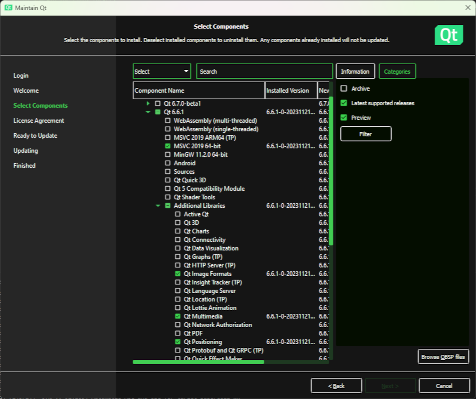
See setup-* scripts for current version
Add the
bindirectory to your systemPATHvariable (e.g.,C:\Qt\6.11.0\msvc2022_64\bin)Alternate install via aqtinstall (installs to a versioned subdirectory within the current directory)
$ python3 pip install --upgrade aqtinstall
$ aqt install-qt windows desktop 6.11.0 win64_msvc2022_64 -m qtimageformats qtmultimedia qtpositioning qtserialport
$ aqt install-qt linux desktop 6.11.0 linux_gcc_64 -m qtimageformats qtmultimedia qtpositioning qtserialport
$ aqt install-qt mac desktop 6.11.0 clang_64 -m qtimageformats qtmultimedia qtpositioning qtserialport
See https://ddalcino.github.io/aqt-list-server/ for additional configurations
Note
Qt versions maintain a level of compatibility between patch releases of the same major and minor versions (e.g., 6.11.0 through 6.11.3). No issues are expected moving between patch releases. Breaking changes may sometimes be introduced in minor releases (e.g., 6.11 to 6.12). As new releases become available, older releases should remain available via the Archive selection filter in the Qt Maintenance Tool or via aqtinstall.
Recommended Tools
Integrated Development Environment
An IDE is strongly recommended to develop Supercell Wx. Microsoft Visual Studio is a good option on Windows, and Visual Studio Code is a good cross-platform option.
For Visual Studio Code, it is recommended to install the following extensions:
For remote development (e.g., Linux development on a Windows host), it is also recommended to install the following:
For UI development, it is recommended to run Qt Creator, installable via the Qt Maintenance Tool or aqtinstall. Alternatively, Qt Designer may be used as a lighter weight option.
Note
Qt Creator has had issues building the Supercell Wx project, with infinite recursion during CMake and Conan configuration, and is therefore only recommended for UI development. These issues may have since been resolved, but your mileage may vary.
Other IDEs are likely to work as well:
Git Tools
A visual tool for navigating the Git repository and submodules can be helpful, but is not required for development.
Initial Configuration
After cloning the repository from GitHub, initialize all submodules:
$ git submodule update --init --recursive
You are now ready to configure your environment. You can use either CMakePresets or pre-generate your build directory (CMake Setup). The choice comes down to personal preference, but the CMake Setup scripts tend to be easier using Microsoft tools (Visual Studio, Visual Studio Code) on Windows, while other tools and platforms benefit from CMakePresets.
If your environment requires any special setup, such as an alternate compiler
configuration, you may configure settings in tools/lib/user-setup.sh (see
tools/lib/user-setup.example.sh).
CMake Presets
Run the tools/configure-environment.{ext} script.
Usage:
  configure-environment.bat [VENV_PATH]
  configure-environment.sh  [VENV_PATH]

  The configure environment script will setup your Python virtual environment,
  install Python requirements and install Conan profiles.

  The VENV_PATH argument will specify the Python virtual environment path to
  use. It defaults to "supercell-wx/.venv/". If you wish to run without a
  virtual environment, specify "none".
Open CMakeLists.txt in your favorite editor, select your desired CMake
Preset, and build the supercell-wx target.
Note
Visual Studio generates its own additional targets. Ensure the Visual Studio configuration matches the preset selected.
Note
Visual Studio Code on Windows requires running from the x64 Native Tools
Command Prompt for VS, or updating your shortcut target (e.g.,
%comspec% /k ""C:\Program Files\Microsoft Visual Studio\18\Community\VC\Auxiliary\Build\vcvars64.bat" ^&^& "C:\Users\username\AppData\Local\Programs\Microsoft VS Code\Code.exe"")
CMake Setup
Run the tools/setup-{config}.{ext} script.
Usage:
  setup-{config}.bat [BUILD_DIR] [VENV_PATH]
  setup-{config}.sh  [BUILD_DIR] [CONAN_PROFILE] [VENV_PATH] [ASAN_ENABLE]

  The setup script will setup your Python virtual environment, install Python
  requirements, install Conan profiles and dependencies, and run CMake
  configure.

  The setup script assumes that Qt has been installed to a default directory
  ("C:\Qt" on Windows, or "/opt/Qt" on Linux). If a custom directory has been
  used, the script will need modified to reflect the custom installation base.

  The BUILD_DIR argument will specify the CMake build directory to use. You
  may specify a relative or absolute path. It defaults to
  "supercell-wx/build-{config}/".

  The CONAN_PROFILE argument will specify the Conan Profile to use. Please
  select a Conan profile present in "tools/conan/profiles/", appropriate for
  your compiler and architecture. This argument is only applicable for Linux
  systems.

  The VENV_PATH argument will specify the Python virtual environment path to
  use. You may specify a relative or absolute path. It defaults to
  "supercell-wx/.venv/". If you wish to run without a virtual environment,
  specify "none".

  The ASAN_ENABLE argument will specify whether or not to enable or disable
  the address sanitizer. A default value of "disabled" will disable the
  sanitizer, while any other value will enable it.
Depending on the generator, either:
Open your solution or project files in the build directory (e.g.,
supercell-wx.sln), orOpen the source directory, pointing your editor to the proper build directory
You are ready to build the supercell-wx target.
Visual Studio Code
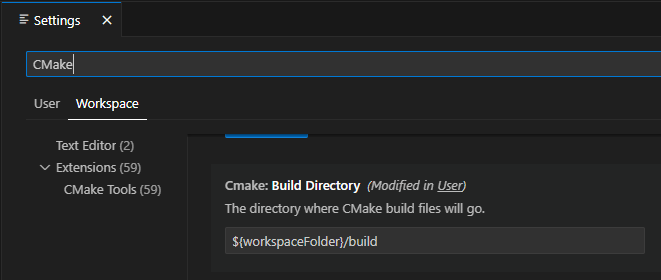
Open the supercell-wx source directory in Visual Studio Code. Open the Settings Window, and filter on CMake. In Workspace settings, set your Build Directory to your desired destination.
On the Primary Side Bar (left), select the CMake icon. Under Build, select the
appropriate Kit (compiler), and set your target to supercell-wx. You can proceed
to build supercell-wx using the Build button on the left side of the Status
Bar.
Troubleshooting
Missing Packages (Linux)
When configuring on Linux, you may encounter an error due to missing packages
from your system. These may be installed manually, or you may update your conan
global configuration (~/.conan2/global.conf):
tools.system.package_manager:mode = install
tools.system.package_manager:sudo = True
After installing missing packages, re-run the setup script.
Compiler or Qt Version Issues
After updating compiler or Qt versions, you may need to update paths in your
CMake cache. This may be done via your IDE, rerunning setup scripts, or by
manually editing CMakeCache.txt located in your build directory.
Guidelines
It is expected that developers will follow these guidelines. On occasion, there will be use cases for deviation from the guidelines below.
Don’t break existing functionality
Follow C++ best practices
Format files after making changes (most IDEs will respect the .clang-format file at the root of the repository)
Follow the Google C++ Style Guide
Keep Qt-dependent code in the
scwx-qtprojectIf adding a dependency, prefer adding it to conanfile.py over adding a submodule, unless additional customization is necessary
Minimize custom development environment configuration
Update acknowledgements when appropriate
Supercell Wx should remain MIT-licensed
Dependencies must be compatible with the MIT license
LGPL-licensed software must be contained within shared libraries
GPL-licensed software must not be used
Help
Stuck? You can look at https://github.com/dpaulat/supercell-wx/blob/develop/.github/workflows/ci.yml for hints, or join the Discord server for help.